Mehrere Domains eine Website
3 SEO-Vorteile, Risiken und Best Practices

Die Nutzung mehrerer Domainnamen für eine einzelne Website ist eine verbreitete Idee unter Website-Betreibern und Einsteigern, die ihre Sichtbarkeit in Suchmaschinen verbessern möchten. Auf den ersten Blick wirkt es naheliegend, mehrere Domains mit relevanten Keywords zu registrieren und auf eine Hauptwebsite weiterzuleiten – als vermeintliche SEO-Abkürzung.
Doch Suchmaschinenoptimierung funktioniert nicht auf diese Weise. Zwar können mehrere Domains bei korrekter Nutzung strategische Vorteile bieten, bei falscher Umsetzung führen sie jedoch schnell zu ernsthaften SEO-Problemen. Entscheidend ist, zu verstehen, wie Suchmaschinen mehrere Domains interpretieren, bevor man sich für diesen Schritt entscheidet.
Dieser Leitfaden erklärt die Vorteile, Nachteile und Best Practices beim Einsatz mehrerer Domainnamen für eine Website – im Einklang mit modernen SEO-Prinzipien.
Mehrere Domains eine Website bedeuten in der Regel eines der folgenden Szenarien:
Mehrere Domains leiten auf eine Hauptdomain weiter
Unterschiedliche Domains zeigen identische oder sehr ähnliche Inhalte
Keyword-basierte Domains verweisen auf eine primäre Marken-Website
Aus Sicht von Suchmaschinen wird jede Domain zunächst als eigenständige Entität behandelt – sofern nicht eindeutig etwas anderes signalisiert wird. Genau hier beginnen die meisten SEO-Probleme.
Vielleicht hast du schon von einer sogenannten „Google Duplicate-Content-Strafe“ gehört. Technisch gesehen existiert diese Strafe nicht. Suchmaschinen wie Google bestrafen Websites nicht allein dafür, dass sie doppelte Inhalte haben. Stattdessen versuchen sie, die relevanteste und autoritativste Version einer Seite für die Suchergebnisse auszuwählen. Wenn mehrere URLs denselben Inhalt anzeigen, müssen Suchmaschinen entscheiden, welche Version gerankt wird – die übrigen werden häufig ignoriert.
Das Ergebnis ist keine Strafe, sondern verlorenes Ranking-Potenzial, verschwendetes Crawl-Budget und eine verwässerte Autorität.
Richtig und strategisch eingesetzt können mehrere Domains eine Website die Online-Präsenz unterstützen.
Zusätzliche Domains können helfen, unterschiedliche Keyword-Varianten abzudecken, insbesondere wenn sie genutzt werden für:
Weiterleitungen
Offline-Marketing
Regionale Ausrichtung (mit korrekter Struktur)
Reine Keyword-Domains bieten jedoch heute keinen Ranking-Vorteil mehr. Qualität, Relevanz und Autorität sind deutlich wichtiger.
Der Besitz mehrerer Domains rund um eine Marke schützt vor:
Registrierung ähnlicher Namen durch Wettbewerber
Markenmissbrauch
Verwirrung bei Nutzern
Dies ist einer der wichtigsten Gründe für mehrere Domains – selbst wenn alle auf eine Hauptseite weiterleiten.
Kurze oder einprägsame Domainnamen eignen sich gut für:
Printwerbung
Podcasts
Social-Media-Kampagnen
In diesen Fällen dienen Domains als Einstiegspunkte – nicht als eigenständige SEO-Projekte.
Die meisten SEO-Probleme entstehen nicht durch mehrere Domains an sich, sondern durch deren falsche Umsetzung.
Wenn mehrere Domains denselben Inhalt ohne klare Signale anzeigen:
Suchmaschinen erkennen die Hauptversion nicht eindeutig
Rankings schwanken
Seiten ranken möglicherweise gar nicht
Besonders Einsteiger veröffentlichen unbeabsichtigt identische Inhalte auf mehreren Domains.
Backlinks sind ein zentraler Ranking-Faktor. Werden Links auf mehrere Domains verteilt:
teilt sich die Autorität auf
keine Domain wird wirklich stark
das Ranking-Potenzial sinkt
Eine starke, autoritative Domain schlägt fast immer mehrere schwache.
Jede zusätzliche Domain erfordert:
technische Pflege
Monitoring
Verlängerungen
Sicherheitsmanagement
Bei kleinen Websites führt das oft zu vernachlässigten Domains – und damit zu SEO-Risiken.
Wenn du mehrere Domains nutzt, solltest du diese SEO-sicheren Best Practices befolgen.
Eine 301-Weiterleitung leitet Nutzer und Suchmaschinen dauerhaft von einer Domain auf eine andere weiter. Sie:
Alle sekundären Domains sollten auf eine kanonische Domain weiterleiten.
Wenn ähnliche Inhalte auf mehreren Domains notwendig sind:
So können Suchmaschinen Ranking-Signale korrekt bündeln.
Deine Hauptdomain sollte:
Zusätzliche Domains sollen unterstützen – nicht konkurrieren.
Domains ausschließlich für Keywords zu registrieren gilt bei falscher Nutzung als manipulativ. Suchmaschinen bewerten vor allem:
Eine starke Marken-Domain mit hochwertigem Inhalt ist langfristig überlegen.
Sinnvolle Einsatzbereiche sind Markenschutz, Kampagnen-Tracking und länderspezifische Websites mit lokalisertem Inhalt. Domains „auf Vorrat“ bringen in der Regel keinen SEO-Mehrwert.
Eine Hauptwebsite mit weitergeleiteten Markenvarianten
Marketing-Domains, die auf eine zentrale Website verweisen
Internationale Domains mit lokalisiertem Content
Derselbe Inhalt auf mehreren Domains
Keyword-Domains zur Ranking-Manipulation
Verteilte SEO-Bemühungen auf mehrere schwache Seiten
Mehrere Domains eine Website sind nicht grundsätzlich schlecht für SEO – aber sie sind selten hilfreich ohne klare Strategie.
Für die meisten Website-Betreiber und Einsteiger ist der sicherste und effektivste Weg:
Fokus auf eine starke, autoritative Domain
Bündelung aller SEO-Signale
Zusätzliche Domains nur als unterstützende Assets nutzen
Suchmaschinen belohnen Klarheit, Konsistenz und echten Mehrwert. Im Zweifel gilt: Struktur vereinfachen und Energie in hochwertigen Content, saubere technische SEO und langfristiges Vertrauen investieren.
Dieser Ansatz skaliert – und rankt – deutlich besser als das Management mehrerer konkurrierender Domains.
Die folgende Grafik fasst alle vorherigen Aspekte zusammen und hilft dir, klar zu entscheiden, ob mehrere Domainnamen für deine Website sinnvoll sind – oder ob eine starke Hauptdomain die bessere Wahl ist.
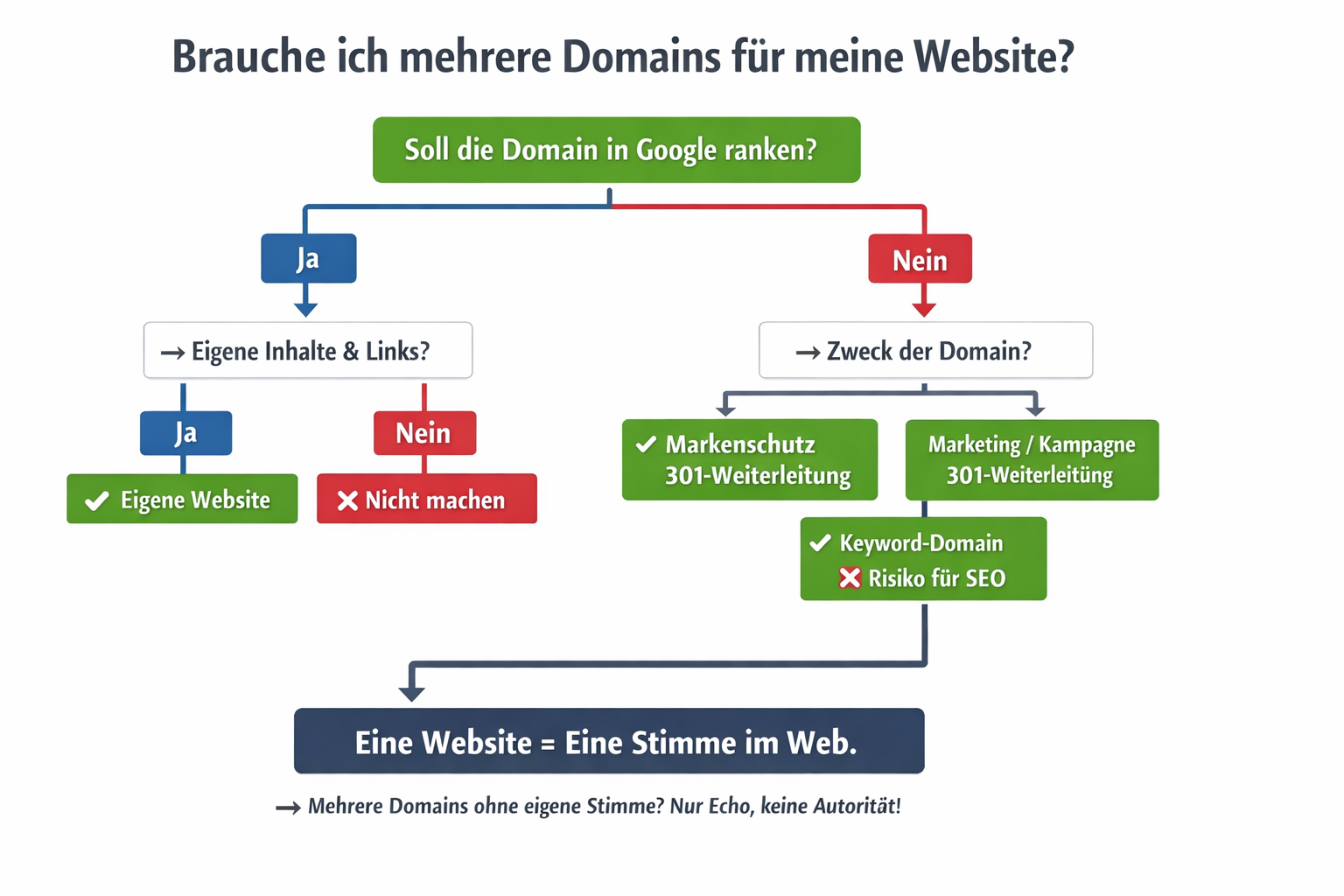
Hinweis: Sonderfälle wie Rebranding, internationale Marken oder Domain-Migrationen erfordern individuelle Strategien.
Gomanos is about digital clarity. We help you understand what actually matters in hosting, backups, and website setup - so you can make confident decisions.
Web Hosting
WordPress Setup
Website Security
Backups & Reliability
Performance & Speed
Hosting
Backups
Security
Optimization
About Gomanos
Contact
Affiliate Disclosure
Privacy Policy
Terms of Use / Disclaimer

Was sind Web Push Benachrichtigungen? 7 zentrale Funktionen einfach erklär...We may request cookies to be set on your device. We use cookies to let us know when you visit our websites, how you interact with us, to enrich your user experience, and to customize your relationship with our website.
Click on the different category headings to find out more. You can also change some of your preferences. Note that blocking some types of cookies may impact your experience on our websites and the services we are able to offer.
These cookies are strictly necessary to provide you with services available through our website and to use some of its features.
Because these cookies are strictly necessary to deliver the website, refusing them will have impact how our site functions. You always can block or delete cookies by changing your browser settings and force blocking all cookies on this website. But this will always prompt you to accept/refuse cookies when revisiting our site.
We fully respect if you want to refuse cookies but to avoid asking you again and again kindly allow us to store a cookie for that. You are free to opt out any time or opt in for other cookies to get a better experience. If you refuse cookies we will remove all set cookies in our domain.
We provide you with a list of stored cookies on your computer in our domain so you can check what we stored. Due to security reasons we are not able to show or modify cookies from other domains. You can check these in your browser security settings.
These cookies collect information that is used either in aggregate form to help us understand how our website is being used or how effective our marketing campaigns are, or to help us customize our website and application for you in order to enhance your experience.
If you do not want that we track your visit to our site you can disable tracking in your browser here:
We also use different external services like Google Webfonts, Google Maps, and external Video providers. Since these providers may collect personal data like your IP address we allow you to block them here. Please be aware that this might heavily reduce the functionality and appearance of our site. Changes will take effect once you reload the page.
Google Webfont Settings:
Google Map Settings:
Google reCaptcha Settings:
Vimeo and Youtube video embeds:
You can read about our cookies and privacy settings in detail on our Privacy Policy Page.
GOMANOS
We firmly believe that the internet should be available and accessible to anyone, and are committed to providing a website that is accessible to the widest possible audience, regardless of circumstance and ability.
To fulfill this, we aim to adhere as strictly as possible to the World Wide Web Consortium’s (W3C) Web Content Accessibility Guidelines 2.1 (WCAG 2.1) at the AA level. These guidelines explain how to make web content accessible to people with a wide array of disabilities. Complying with those guidelines helps us ensure that the website is accessible to all people: blind people, people with motor impairments, visual impairment, cognitive disabilities, and more.
This website utilizes various technologies that are meant to make it as accessible as possible at all times. We utilize an accessibility interface that allows persons with specific disabilities to adjust the website’s UI (user interface) and design it to their personal needs.
Additionally, the website utilizes an AI-based application that runs in the background and optimizes its accessibility level constantly. This application remediates the website’s HTML, adapts Its functionality and behavior for screen-readers used by the blind users, and for keyboard functions used by individuals with motor impairments.
If you’ve found a malfunction or have ideas for improvement, we’ll be happy to hear from you. You can reach out to the website’s operators by using the following email
Our website implements the ARIA attributes (Accessible Rich Internet Applications) technique, alongside various different behavioral changes, to ensure blind users visiting with screen-readers are able to read, comprehend, and enjoy the website’s functions. As soon as a user with a screen-reader enters your site, they immediately receive a prompt to enter the Screen-Reader Profile so they can browse and operate your site effectively. Here’s how our website covers some of the most important screen-reader requirements, alongside console screenshots of code examples:
Screen-reader optimization: we run a background process that learns the website’s components from top to bottom, to ensure ongoing compliance even when updating the website. In this process, we provide screen-readers with meaningful data using the ARIA set of attributes. For example, we provide accurate form labels; descriptions for actionable icons (social media icons, search icons, cart icons, etc.); validation guidance for form inputs; element roles such as buttons, menus, modal dialogues (popups), and others. Additionally, the background process scans all the website’s images and provides an accurate and meaningful image-object-recognition-based description as an ALT (alternate text) tag for images that are not described. It will also extract texts that are embedded within the image, using an OCR (optical character recognition) technology. To turn on screen-reader adjustments at any time, users need only to press the Alt+1 keyboard combination. Screen-reader users also get automatic announcements to turn the Screen-reader mode on as soon as they enter the website.
These adjustments are compatible with all popular screen readers, including JAWS and NVDA.
Keyboard navigation optimization: The background process also adjusts the website’s HTML, and adds various behaviors using JavaScript code to make the website operable by the keyboard. This includes the ability to navigate the website using the Tab and Shift+Tab keys, operate dropdowns with the arrow keys, close them with Esc, trigger buttons and links using the Enter key, navigate between radio and checkbox elements using the arrow keys, and fill them in with the Spacebar or Enter key.Additionally, keyboard users will find quick-navigation and content-skip menus, available at any time by clicking Alt+1, or as the first elements of the site while navigating with the keyboard. The background process also handles triggered popups by moving the keyboard focus towards them as soon as they appear, and not allow the focus drift outside it.
Users can also use shortcuts such as “M” (menus), “H” (headings), “F” (forms), “B” (buttons), and “G” (graphics) to jump to specific elements.
We aim to support the widest array of browsers and assistive technologies as possible, so our users can choose the best fitting tools for them, with as few limitations as possible. Therefore, we have worked very hard to be able to support all major systems that comprise over 95% of the user market share including Google Chrome, Mozilla Firefox, Apple Safari, Opera and Microsoft Edge, JAWS and NVDA (screen readers).
Despite our very best efforts to allow anybody to adjust the website to their needs. There may still be pages or sections that are not fully accessible, are in the process of becoming accessible, or are lacking an adequate technological solution to make them accessible. Still, we are continually improving our accessibility, adding, updating and improving its options and features, and developing and adopting new technologies. All this is meant to reach the optimal level of accessibility, following technological advancements. For any assistance, please reach out to
